A New Flow: Faster Visits, Easier Records, and Safer Medication Work
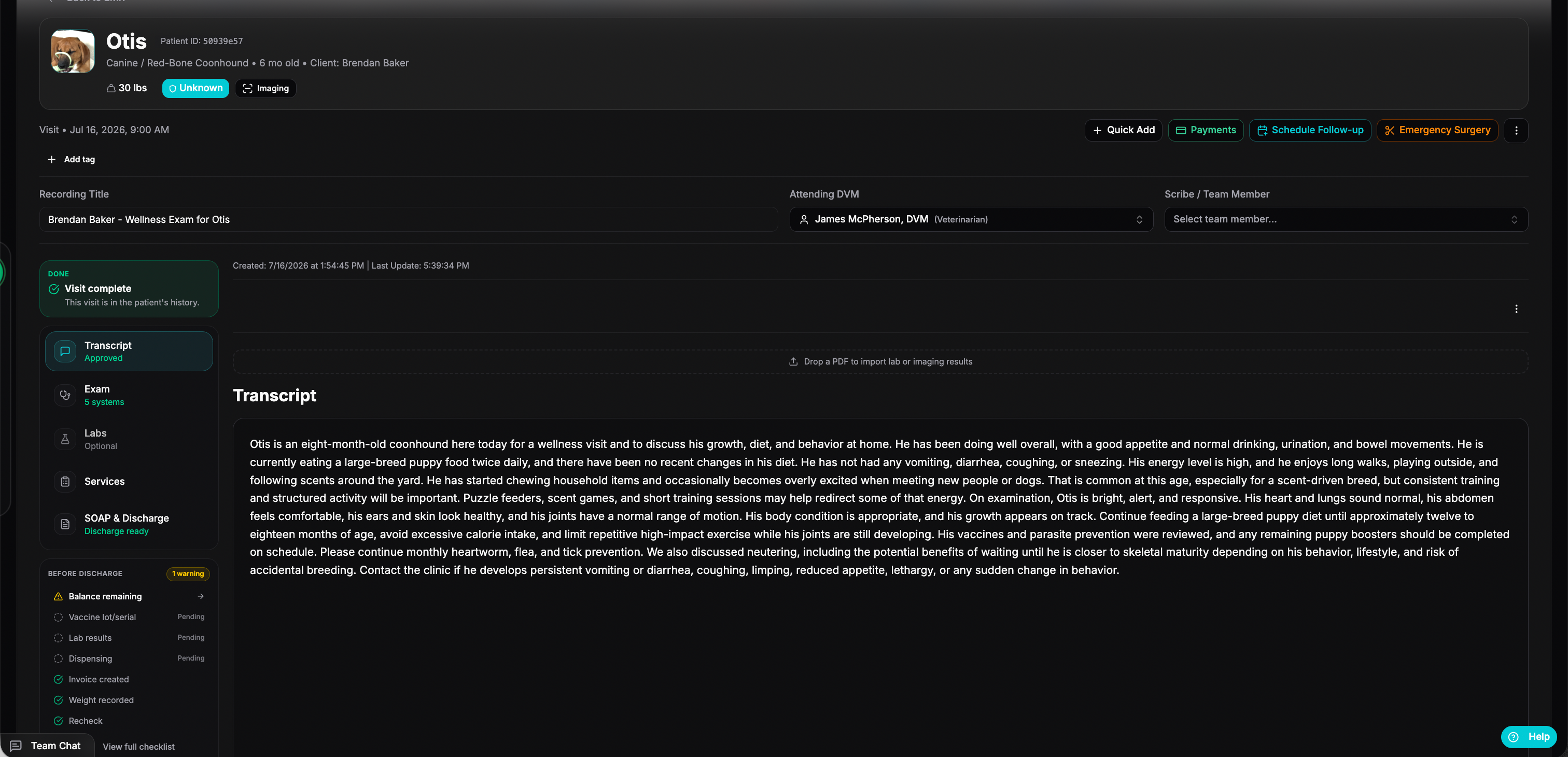
This is one of our largest PawthosX One updates yet.
For Release on July 23rd, 2026
The biggest change is a full remodel of Flow, the workspace your team uses to move a patient through a visit. We also added a complete medication-request system, easier patient record imports, stronger controlled-medication tracking, and many smaller improvements.
Meet the new Flow
Flow has been rebuilt to make each visit easier to understand and finish.
The new layout helps your team quickly see:
Where the patient is in the visit.
Who is responsible for the next step.
What has already been completed.
What still needs attention before the patient leaves.
Your team can move more clearly between the exam, treatments, services, labs, medications, SOAP notes, invoices, and discharge instructions.
Finish visits with fewer loose ends
The new visit-completion tools help your team catch unfinished work before closing a visit.
PawthosX One can help check for:
An unfinished SOAP note.
Pending lab results.
Medications that still need attention.
A recheck that has not been scheduled.
An invoice or payment that is not complete.
Discharge instructions that have not been sent.
Missing patient weight or vaccine information.
Your team stays in control and decides when the visit is complete.
Better patient information inside the visit
Flow now gives your team a clearer view of the patient without forcing them to jump between screens.
This includes:
Important patient details and alerts.
Recent medical history.
Visit progress.
Upcoming care and follow-up needs.
AI-assisted patient summaries inside the medical record.
The goal is simple: give the team the right information while they are doing the work.
Family Visits
Multiple pets from the same family can now be handled as one connected visit.
Your team can:
Schedule and manage the pets together.
See the whole family visit in one place.
Keep a separate medical record for each pet.
Check the family out together or separately.
Create one grouped invoice with charges organized by pet.
That means less bouncing between records when one client brings in several pets.
Medication requests from start to finish
Your team can now manage medication requests in one clear workflow.
Staff can enter a refill or new medication request.
A veterinarian can approve or deny the request.
Suggested directions, dose, frequency, and veterinarian information stay with the request.
Free-text requests can be matched to the correct medication.
Approved medications move to the correct pickup or dispensing list.
Dispensed medications can move directly to billing.
Each request stays connected as it moves from Requested to Approved, Dispensed, and Ready to Bill.
Better refill checks
PawthosX One now checks whether a refill can safely be used.
Valid refills use the existing prescription instead of creating a duplicate.
The number of remaining refills is shown.
Expired, inactive, empty, and Schedule II prescriptions require a new prescription.
The system helps prevent the same refill from being used twice.
Suggested medication details no longer disappear during approval.
Clear medication worklists
Medication work is now divided into simple lists:
Approval Queue for requests waiting for a veterinarian.
Fulfillment for approved medications waiting to be dispensed.
OTC Pickups for over-the-counter items waiting for collection.
Ready to Bill for dispensed items that have not been invoiced.
Pickup requests can also be cancelled when the client does not collect the medication.
Outside medications are easier to find
The patient section previously called External Medication Requests is now called Outside Medications.
This section holds medications the patient receives outside your clinic. The information works the same way, but the new name is easier to understand.
Import patient records with less typing
The patient record importer can now turn uploaded files into organized patient information.
Upload one file or a large group of records.
Blank pages, duplicate pages, consent forms, and letterhead can be skipped.
Review which pages will be used before importing them.
Import scanned and image-based PDFs.
Keep the original files attached to the patient record.
Create a new client and patient or connect the records to an existing patient.
Import past visits and laboratory information.
Large imports can keep working
You no longer need to keep the import window open while PawthosX One reviews a large record.
Live progress shows which file is being reviewed.
You can close the window and return later.
Finished imports wait for your review.
Failed items can be retried without repeating everything.
Interrupted imports show a clear message instead of loading forever.
Submitting the same import twice will not create duplicate records.
Imported historical visits also do not send appointment emails or text messages to the client.
Safer controlled-medication tracking
Controlled medications now have stronger checks from receiving through dispensing.
Controlled stock must be connected to a valid container.
Controlled inventory changes require approval.
Approved changes create the correct controlled-medication log entry.
The system checks amounts, dates, witnesses, and the order of log entries.
Controlled lots with stock cannot be quietly disabled or moved.
Duplicate dispensing and dispensing above the approved amount are blocked.
This helps keep the physical inventory and the controlled-medication log together.
Better controlled-medication corrections
When a controlled medication is voided, PawthosX One now reverses each part of the original dispense.
If medication came from several lots or containers, inventory is returned to the correct places and the proper corrections are added to the log.
New controlled-medication permissions
A new Controlled Substances permission controls who can:
Add manual controlled-medication entries.
Create controlled-medication books.
Export controlled-medication records.
Email complete controlled-medication logs.
A team member can still be allowed to view inventory without being allowed to change or export controlled-medication information.
Safer reports and exports
Complete controlled-medication logs can only be emailed to an active member of the clinic team.
Reports also show more accurate balances. Warning messages now appear when PawthosX One finds a real difference, rather than showing false warnings caused by a date filter.
Clearer container selection
Controlled-medication screens now make it easier to select the correct container.
Choose from a list instead of typing a container ID.
See each container’s status and balance.
Use a new container after it has been received.
Adjustments cannot be submitted until a container is selected.
Destroyed containers cannot be used for new activity.
Better access for dispensing teams
Team members with Dispense access can now search medications, view lots and containers, and complete dispensing without needing full inventory-management access.
Protected actions, such as receiving or adjusting stock, still require the correct inventory permission.
Safer invoice merging
Invoice merging now includes stronger safety checks.
PawthosX One checks for payments that would make a merge unsafe.
Medication and dispensing links move to the combined invoice.
Pricing rules are checked again after invoices are combined.
An issue that could charge too much during a merge has been fixed.
Several invoice-merge errors have also been corrected.
Better SOAP notes and discharge instructions
For appointment types with automatic creation enabled, SOAP notes and discharge instructions can be created as the visit moves into invoicing.
This helps keep the medical record, client instructions, and billing steps connected.
Custom templates and SOAP formatting is coming soon!
Better forms and questionnaires
Signature boxes no longer freeze after the first line.
Files uploaded by clients can be downloaded again.
Information-only questions display their text correctly.
Long answers are no longer covered by the top of the page.
Form-response reports no longer overlap the page heading.
Automation links now open in the same browser tab.
Scheduling and notification improvements
Opening a new appointment without a start time no longer causes an error.
The extra per-patient Schedule button has been removed from the client page.
Notifications now include a Clear all button.
Clearing notifications also updates the notification bell.
Individual alerts can still be dismissed.
Better mobile screens
PawthosX One now works better on phones and smaller screens.
This includes:
A cleaner mobile header.
Tables that change into easier-to-read cards.
A phone-friendly schedule view.
Better spacing on narrow screens.
Desktop layouts continue to work the same way.
New patient-page tools and guides
Patient pages now include a new side menu for faster navigation.
New in-app tours also help team members learn where to click and how to use newer PawthosX One tools.
And much much more! If you have questions please reach out to your PawthosX Clinic Partner or message us here!